TikTok has become a powerful channel for DTC ecommerce brands that want faster reach and stronger engagement. Shopify merchants are seeing real growth when they pair the speed of short form content with a storefront that is built to convert. When both platforms work as one flow, brands move from basic exposure to real revenue.
This connection gives Shopify sellers direct access to TikTok Shop. That access lets shoppers browse and buy without leaving the app. It also creates a chance for merchants to showcase products through creators who already hold attention. The opportunity expands even further when the brand has a fulfillment operation that can keep pace with rising order volume.
Why TikTok Shop and Shopify Work Well Together for Scalable Ecommerce
Top Five Shopify Apps That Integrate with TikTok Shop
- TikTok Shopify App: The official TikTok app for connecting product feeds and enabling order flow between the two platforms. It manages catalog sync and ad level integration.
- DPL – TikTok Shop Integration: Dedicated to syncing products, inventory, orders & fulfilment between Shopify and TikTok Shop in real time
- CedCommerce TikTok Shop Connector: Another full-featured connector with automates listings, inventory sync, orders, returns/refunds for TikTok Shop + Shopify
- TikTok Shop Connector – SPL: Strong for scalable operations: multi-shop support, real-time sync, bulk listing, multi-currency/language options
- QuickSync for TikTop Shop: Syncs with TikTok Shop in Realtime
How to Install and Configure TikTok Shopify App
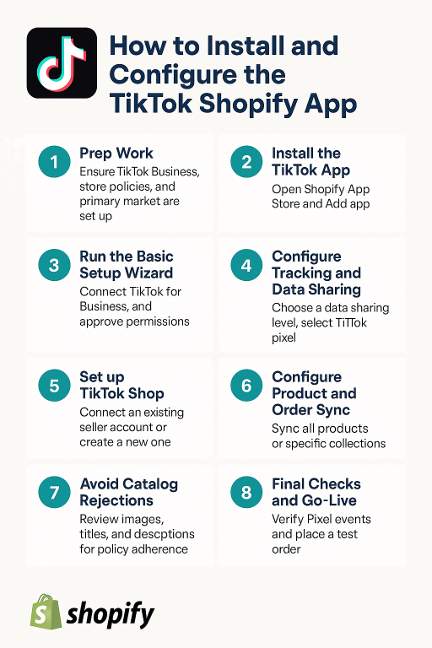
Make sure you have:
- A Shopify store (trial or paid) and admin access.
- A TikTok account upgraded to Business, plus:
- TikTok for Business account
- TikTok Business Center
- TikTok Ads Manager (if you’ll run ads)
- Your store’s primary market, currency, and policies set correctly in Shopify (TikTok uses these for your catalog and TikTok Shop).
- Log in to Shopify admin.
- Go to Settings → Apps and sales channels.
- Click Shopify App Store.
- In the search bar, type “TikTok”.
- Find the official app by TikTok Inc. (listed as “TikTok – TikTok Ads & TikTok Shop Integration” with TikTok as the developer).
- Click Add sales channel / Add app, then install and accept the requested permissions.
You’ll now see TikTok in the left sidebar under Sales channels in Shopify.
- In Shopify admin, click TikTok under Sales channels.
- You’ll see setup cards like:
- Connect TikTok for Business
- Set up TikTok Pixel / Data Sharing
- Set up TikTok Shop
- On the first card, click Connect:
- Log in to TikTok (if prompted).
- Connect:
- A TikTok for Business account
- A Business Center account
- A TikTok Ads Manager account
- Approve the permissions so Shopify can manage pixel, catalog, and orders.
- In the TikTok sales channel, go to the Data Sharing / Pixel section.
- Choose your data sharing level (Standard, Enhanced, or Maximum).
- Click Create Pixel or select an existing TikTok pixel from the dropdown.
- Save. This automatically installs the TikTok pixel on your Shopify storefront so TikTok can track views, add-to-cart, purchases, etc.
- Use TikTok’s Test Events mode to trigger a test page view / add-to-cart / checkout and confirm events are firing correctly.
- In the TikTok channel in Shopify, find the TikTok Shop card and click Set up now / Connect.
- Either:
- Connect an existing TikTok Shop seller account, or
- Create a new one, then complete the onboarding flow (business details, legal documents, warehouse address, etc.).
- Confirm region / country and agree to TikTok Shop policies and terms.
Once connected, TikTok will start creating a marketing catalog using your Shopify primary market settings and products.
In the TikTok sales channel (under Product Sync or Catalog):
- Choose which products to sync:
- All products, or
- Specific collections / individual products.
- Confirm:
- Correct currency and language.
- How inventory and orders will sync (TikTok Shop orders flowing back into Shopify as regular orders).
TikTok will then submit your synced products for catalog approval.
The most common issue is catalog approval failures due to policy violations. To keep things smooth:
- Review product images:
- No watermarks, logos of other platforms, or misleading imagery.
- Clear, high-quality photos that accurately show the product.
- Review titles and descriptions:
- No restricted products (weapons, adult content, etc.).
- Avoid exaggerated medical/health claims or prohibited words per TikTok’s ad and commerce policies.
- If items are rejected, check the reason in your TikTok Business Center / TikTok Shop dashboard, adjust the content in Shopify, and let it re-sync.
- In TikTok Events Manager, confirm:
- Pixel is active.
- Events like Page View, Add to Cart, and Purchase are firing from your test sessions.
- In TikTok Shop:
- Confirm key products show as Approved / Active.
- Place a small test order to verify it appears in Shopify and inventory updates correctly.
Once those are green, you’re fully installed and configured: products sync, orders flow back to Shopify, and TikTok has tracking to optimize ads.
How to Optimize Product Feeds and Creative for Strong TikTok Performance
Product titles should be clear and focused. TikTok shoppers move quickly. Clean formatting helps the product stand out. Avoid long strings of keywords and keep descriptions straightforward.
Creative is the other half of performance. TikTok content succeeds when it feels native to the platform. Use short clips that highlight real product benefits. User generated style content performs well because it aligns with how customers use the product.
Fulfillment Requirements for TikTok Shop and Expectations for Shopify Brands
TikTok expects fast shipping and accurate tracking. These expectations impact how Shopify merchants set up their fulfillment workflows. Orders must be processed quickly and shipped within the promised window. Any delays can reduce visibility inside TikTok Shop.
Inventory accuracy is equally important. If your feed shows products in stock when they are not, TikTok may suspend listings. Brands that want reliable growth need clean reporting and warehouse level accuracy.
Shopify settings need to match TikTok expectations. Create shipping profiles that reflect real transit times. Keep your packaging weights updated. TikTok wants shoppers to receive a reliable delivery experience and penalizes sellers that fall short.
“When someone asks how to win on TikTok Shop, I always start with the unsexy stuff. Shipping speed and inventory accuracy. If Shopify and TikTok are integrated and in sync with your 3pl, you scale without overselling or scrambling.”
-Erik Tonge
How MAI Fulfillment Supports Brands Selling on TikTok and Shopify
MAI Fulfillment strengthens TikTok fulfillment for brands that need fast processing and precise execution. The team moves orders quickly which supports the short shipping windows required by TikTok Shop and protects visibility inside the platform. Same day shipping keeps customers confident and improves the overall buying experience.
The operation also supports Shopify fulfillment with a fully integrated system that has real time inventory sync that keeps stock accurate across every channel. This prevents overselling and reduces delays as orders flow from Shopify to the warehouse. Dedicated in house support gives brands a direct line to problem solving so fulfillment stays consistent even as volume scales.
Common Mistakes When Connecting TikTok Shop with Shopify
- Incorrect product mapping can break listings and reduce visibility. Mapping each variant correctly keeps the catalog consistent.
- Feed sync delays often result from missing data. Clean product titles and accurate attributes prevent slowdowns.
- Pixel tracking issues disrupt campaign performance. Testing each event ensures data flows correctly.
- Shipping settings that differ between platforms can confuse customers. Matching transit times protects conversion.
- Inventory mismatches create overselling risks. Strong warehouse level accuracy protects TikTok Shop compliance.
Automation Opportunities Once the Integration Is Live
Once the Shopify and TikTok systems are connected, automation helps brands scale. Automated inventory sync tools reduce manual work and keep stock accurate. Automated order routing also improves speed by pushing orders to the correct fulfillment center without delays.
Operational visibility grows as brands use integrated tools. When Shopify data and TikTok Shop performance metrics feed into one view, leaders can make faster decisions. This creates a stronger foundation for growth as order volume increases.